
Shopify theme · Cosmetics & skincare
Solene
A clean, bright cosmetics store with a full customer account area.
2,490 UAH
One-time payment · licence for one store
The texts, images and products in the demo are samples only. The store is published in your name, and responsibility for everything on it is yours alone, not SHio's. Details in our terms

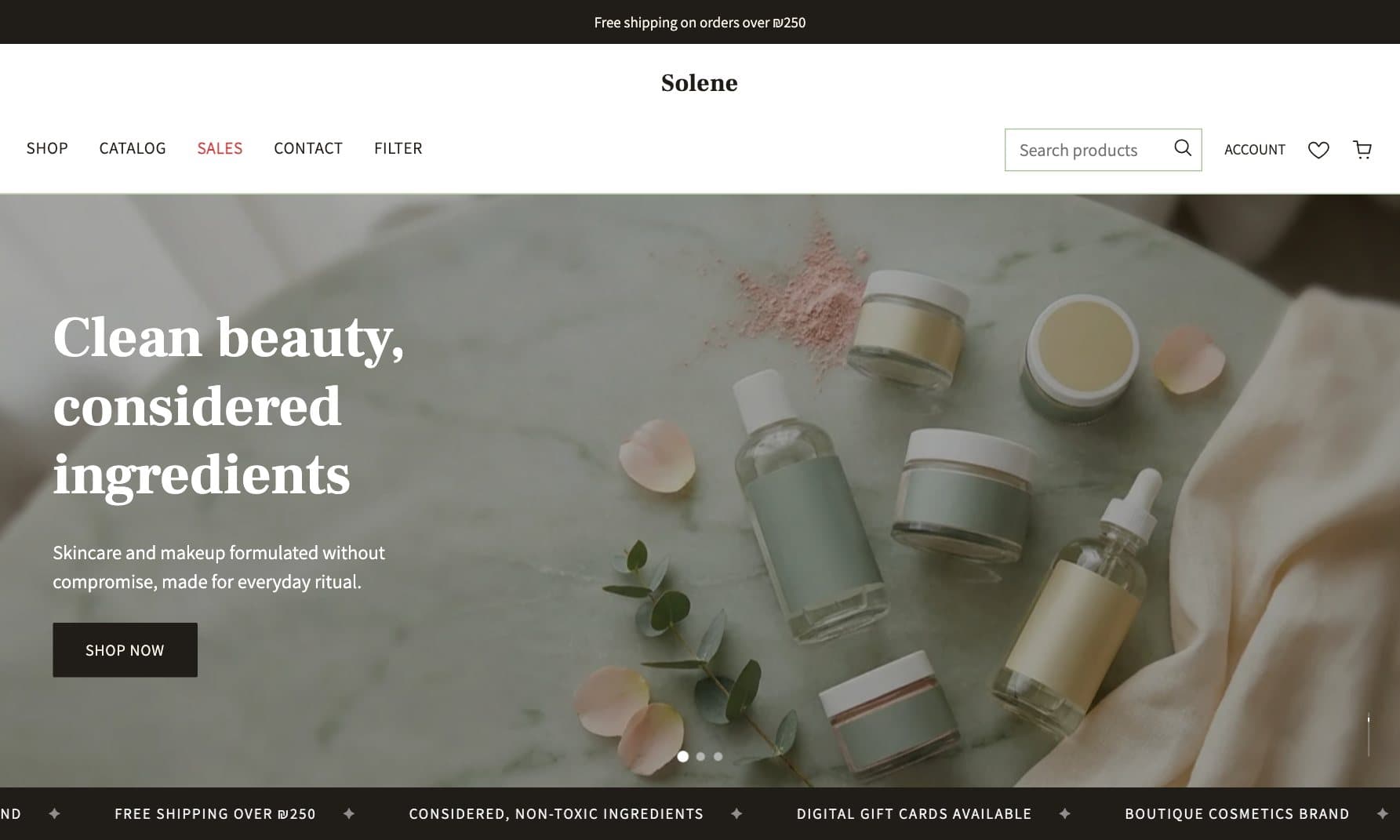

How it looks
Real screenshots of the demo store. Click a screen to enlarge it.
Home page
A clean banner, a marquee and a row of perks: shipping, returns, secure payment.
Mega menu with pictures
Every category in a round photo, right from the top menu.
Product page
Product details, ingredients and how to use, size and quantity.
Pop-up cart
Every add opens a drawer with the item and two clear buttons.
Digital gift cards
A block that sells gift cards delivered to the customer by email.
Cookie banner
Consent per category, with tracking codes blocked until the customer agrees.
What is inside
- Header category mega-menu, fully configurable from Shopify's own Navigation admin
- Native Shopify collection filtering (price range + category) and price sorting — no paid app required
- Example placeholder products on an empty collection, so a freshly linked category page never looks broken
- A full classic Shopify customer account system: sign in, register, password recovery/reset, account activation, order history, order detail, address book with a default address
- A real newsletter signup (footer + homepage section) that creates an actual subscribed Shopify customer
- A cookie banner with category-level consent (necessary / analytics / marketing) that actually gates the tracking scripts until accepted
- Digital gift cards
- Floating WhatsApp and phone buttons
- Built-in languages: Hebrew, English and Ukrainian
From purchase to a live store
- PayAdd the theme to the cart, enter your email address, press «Proceed to payment» and pay by card, Apple Pay or Google Pay on monobank's secure page. It's a one-time payment and the price is final.
- Wait for our emailOnce payment is confirmed, an order confirmation email arrives with a button to download the theme. Not there? Check your Spam folder.
- Download the fileClick the download button in the email and a ZIP file is saved to your computer (usually in the «Downloads» folder). You don't need to open or unpack it. The link works for 30 days; after that you can download it again any time from My account, or reply to the email and we'll send a new one.
- Go into your Shopify storeSign in to your store's Shopify Admin (the address is usually your-store-name.myshopify.com/admin) and in the left-hand menu choose Online Store, then Themes.
- Upload the themeClick Add theme, then Upload zip file, choose the file you downloaded and click Upload. After a moment the theme appears in the list.
- Turn it onWhen it's in the list, click Publish and from that moment your store looks like this. You can first click Customize to see how it looks, without publishing.
- Change things with no codeThe Customize button opens Shopify's own editor: click a text, photo or colour and change it directly. The license is for one store of one business, and the rights in the theme stay with SHio.
- Stuck? We're hereAt any step you can reply to the email or message us on WhatsApp. The first two weeks after purchase include free support: bug fixes and answers to your questions within 24 hours.
Good to know
The photos in the demo store were made with AI, for illustration only. You replace them with your own in Shopify's theme editor, no code.
The theme does not include terms, a privacy policy or an accessibility statement. Store policies are written in Shopify's settings, and their content and the store's accessibility (e.g. the DSTU EN 301 549:2022 standard) are the store owner's responsibility. SHio is not a law firm and is not responsible for this content — consult your own lawyer, and an accessibility consultant where needed, before the store goes live.